

Best for review-led retention: Tranthor. Best for WhatsApp-focused operations: WATI. Best for shared messaging workflows: respond.io. Best for hands-on customer conversations: WhatsApp Business. These Klaviyo alternatives for WhatsApp marketing solve different jobs; this 2026 guide helps you choose the workflow your Shopify store actually needs.
- Tranthor suits Shopify owners seeking review-led retention drafts, not just another messaging inbox.
- Compare Klaviyo alternatives for WhatsApp marketing by audience preparation, approval control, and conversation ownership.
- WATI fits WhatsApp-focused operations; respond.io fits shared messaging workflows.
- Keep Klaviyo or Omnisend if email remains useful; evaluate WhatsApp separately before replacing either.
Why this matters
A WhatsApp campaign creates work before and after the send. Someone must identify the customer moment, prepare an eligible audience, approve the message, and handle replies. Buying a messaging tool does not automatically remove those jobs.
For a Shopify owner without a dedicated CRM team, the practical question in 2026 is not which platform has the longest feature list. It is which platform takes over the work you cannot reliably complete yourself. Separate retention preparation from messaging operations before comparing vendors.
You also do not have to replace your existing email setup. A WhatsApp tool can serve a different operational role, provided you decide which system owns audiences, exclusions, and campaign timing.
What makes the best WhatsApp marketing alternative?
Use these criteria before looking at the shortlist:
- Retention preparation: Does the product identify a purchase-related moment and prepare an audience, or do you supply both?
- Approval control: Can you inspect the proposed audience and message before sending? Establish what happens when you decline a draft.
- WhatsApp operations: Check the account setup, template process, delivery reporting, and reply-handling workflow for your intended use.
- Shopify context: Confirm which store events reach the platform and how customer identities match across systems.
- Conversation ownership: Decide who handles replies, changes to orders, and customers who want to stop receiving messages.
- Measurement discipline: Separate attributed orders from evidence that a campaign caused additional purchases.
For your 2026 evaluation, bring 10 customer records, 2 proposed audiences, and 1 retention playbook to each demonstration. These are suggested test inputs, not performance benchmarks. Use the same examples so you can compare the work each option actually completes.
Klaviyo alternatives for WhatsApp marketing at a glance
| Option | Best for | Standout capability or approach | Key limitation or trade-off |
|---|---|---|---|
| Tranthor | Review-led retention preparation | Detects retention moments and drafts campaigns for approval | You still need to evaluate WhatsApp setup and reply ownership |
| WATI | WhatsApp-focused operations | Business messaging, a shared inbox, and automation | Retention judgment still needs evaluation against your store workflow |
| respond.io | Shared messaging workflows | Shared conversations and workflow automation across messaging channels | Conversation management is not the same job as identifying purchase moments |
| WhatsApp Business | Hands-on customer conversations | Direct business messaging through an app | Manual audience preparation and follow-up remain your responsibility |
The order reflects a Shopify owner buying help with retention, rather than a support team buying an inbox. If managing replies is your main problem, start with the messaging-focused options instead.
1. Tranthor: best for review-led Shopify retention
Tranthor is best for Shopify owners who want retention moments turned into campaign drafts they can approve. The system watches store signals, finds repeat-purchase or churn-risk moments, and prepares the audience and message for email, SMS, or WhatsApp campaigns.
Playbooks start in review. You inspect the proposed action and decide when to allow autonomous sending within limits you set. That makes the buying decision about delegated retention work, not simply access to another sending channel.
Pros:
- Connects the retention moment with audience and message preparation.
- Supports campaign drafting across email, SMS, and WhatsApp.
- Starts playbooks in review rather than requiring immediate autonomous sending.
- Leaves the decision to permit autonomous sending with the merchant.
Cons:
- Reviewing drafts remains a real operating responsibility.
- You must assess WhatsApp account setup and reply handling separately during evaluation.
- Attributed revenue does not establish incremental lift, profit, or verified churn reduction.
Ask for a walkthrough using a customer whose next purchase appears overdue. Inspect the signal behind the recommendation, the proposed audience, the draft message, and the approval decision. Then ask what prevents that customer from receiving a conflicting campaign elsewhere.
Best for: Shopify owners who need help preparing retention actions and want control over sending.
Verdict: Buy for review-led retention preparation; hold if your primary requirement is a shared support inbox.
2. WATI: best for WhatsApp-focused operations
WATI provides business messaging tools centered on WhatsApp, including a shared inbox and automation. It belongs on your shortlist when your immediate problem is organizing WhatsApp communication rather than deciding which retention opportunity deserves attention.
Evaluate the campaign workflow and the conversation workflow together. A message that generates replies creates an operational obligation; check how those replies reach the person responsible for resolving them.
WATI pros:
- Keeps the evaluation centered on WhatsApp business operations.
- Provides shared-inbox functionality for handling conversations.
- Offers automation for repeatable messaging workflows.
WATI cons:
- Messaging automation does not, by itself, establish which purchase moment deserves a campaign.
- You still need rules for audience eligibility, exclusions, and follow-up ownership.
- A WhatsApp-first buying decision does not settle your email retention workflow.
Bring a hypothetical repeat-purchase campaign to the demonstration. Ask the vendor to show where the audience comes from, where the message is reviewed, and how a customer reply changes the next action. Verify the Shopify data connection required for that exact workflow rather than assuming an integration covers every event.
Best for: Merchants prioritizing WhatsApp campaign operations and customer conversations.
Verdict: Buy for a WhatsApp-centered operating workflow; hold until the store-data requirements are demonstrated.
3. respond.io: best for shared messaging workflows
respond.io provides a shared messaging workspace with workflow automation across messaging channels. Its relevant buying case is coordinated conversation handling: keeping incoming messages and follow-up work organized rather than leaving them with an individual operator.
That is distinct from retention preparation. A shared workspace can organize the conversation, but your evaluation must still establish who identifies the purchase opportunity and supplies the eligible audience.
respond.io pros:
- Brings messaging conversations into a shared workspace.
- Supports workflow automation around conversations.
- Fits an evaluation where handoffs matter alongside outbound messages.
respond.io cons:
- A shared messaging workspace does not replace a defined retention strategy.
- Workflow configuration and ownership still require attention.
- Shopify event coverage must be checked against the campaign you intend to run.
Test a customer who replies to a campaign with an order question. Show how the conversation reaches its owner and how the team avoids continuing a promotional sequence while that question remains unresolved. Evaluate this behavior directly rather than treating an automation feature label as proof.
Best for: Stores that need shared ownership of messaging conversations and follow-up workflows.
Verdict: Buy when conversation coordination is the bottleneck; hold if you mainly need retention opportunities prepared for review.
4. WhatsApp Business: best for hands-on conversations
The WhatsApp Business app supports direct business conversations with customers. It is the manual alternative when you want to understand customer questions and manage follow-up yourself before introducing a more involved campaign system.
Do not treat manual messaging as a substitute for permission or a way around WhatsApp rules. You still need an appropriate basis for contacting customers and a process for respecting their preferences.
WhatsApp Business pros:
- Keeps the merchant close to customer replies.
- Supports direct, individual business conversations.
- Lets you learn the questions customers ask before automating a workflow.
WhatsApp Business cons:
- You prepare audiences and messages yourself.
- Follow-up depends on your recordkeeping and attention.
- It does not perform the store-signal-to-retention-draft workflow described above.
Use a written follow-up list with the customer's permission status, purchase context, message purpose, and next action. If you cannot explain why a customer belongs on that list, do not send merely because you have their phone number.
Best for: Owners who can personally manage customer conversations and follow-up records.
Verdict: Buy into the manual approach for learning and direct contact; skip it as a substitute for automated retention preparation.
Should you replace Klaviyo or Omnisend?
Keep a working email operation unless you have a specific reason to replace it. Klaviyo and Omnisend are relevant alternatives for ecommerce email and SMS workflows, but a WhatsApp requirement deserves its own evaluation.
For either platform, check the current WhatsApp delivery route, required integrations, audience synchronization, and responsibility for replies. Do not assume that an email campaign workflow transfers unchanged to WhatsApp.
Compare replacement with addition. Replacing your existing system means reviewing the workflows you already depend on; adding another system means preventing overlapping audiences and conflicting sends. Neither choice removes the need for a clear owner.
A useful decision rule: retain the system that performs its current job reliably, then buy only the missing capability. Do not rebuild email merely to acquire a messaging inbox.
Test the full retention workflow before committing
Use this sequence during your 2026 buying process. It follows the work from customer signal to measured outcome, rather than judging the appearance of a message editor.
Watch signals
Choose a real store event or purchase pattern. Ask where the data comes from, when it becomes usable, and what happens when a record is incomplete.
Find moments
Define why the customer deserves attention now. A hypothetical example is a repeat buyer whose usual purchase interval has passed; that is an illustration, not an observed customer result.
Prepare audience
Check permission, exclusions, recent purchases, and overlapping campaigns. Inspect individual records rather than accepting a segment name as evidence that membership is correct.
Review messages
Read the draft alongside the customer context. Check the purpose, wording, and applicable WhatsApp template requirements before approving the action.
Send within limits
Specify what the system is allowed to send and when human approval remains required. Name the person who handles replies and pauses inappropriate follow-up.
Check outcomes
Inspect delivery, replies, attributed orders, and customer complaints. Treat attributed revenue as a reporting view, not proof that the campaign created additional profit.
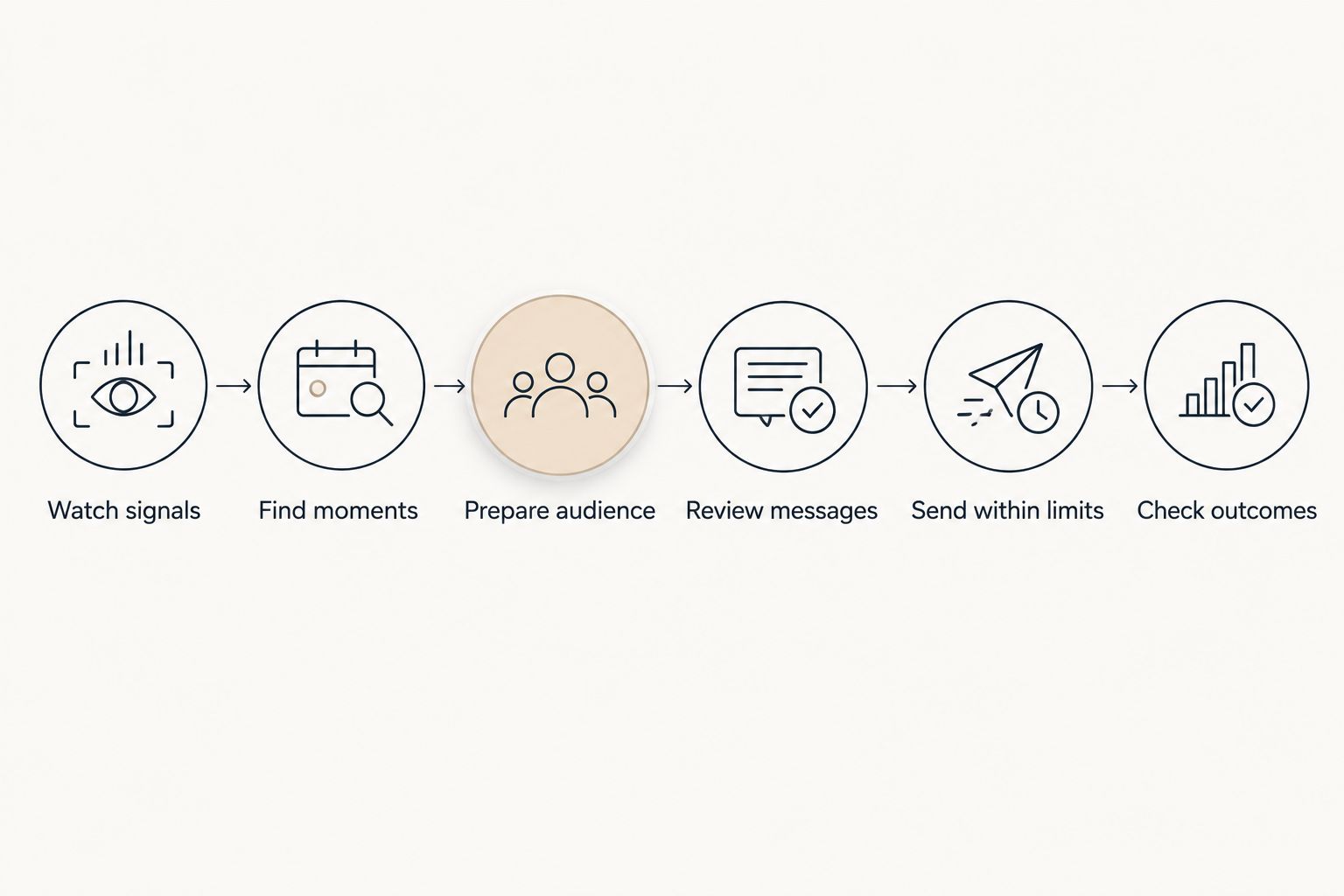
The decisive test is whether you can explain each transition. If nobody owns an exclusion rule or a reply queue, fix that gap before approving autonomous sending.
Explore review-led retention
See how store signals become campaign drafts, with playbooks starting in review.
How the shortlist is ranked
This 2026 shortlist prioritizes retention preparation, approval control, messaging operations, and merchant workload. It separates those jobs instead of declaring that every tool competes on the same dimension.
The rankings are buying recommendations, not results from a performance trial. Confirm current capabilities against your Shopify data, WhatsApp requirements, and operating responsibilities before committing.
Which WhatsApp marketing alternative should you choose?
Choose Tranthor for WhatsApp marketing when your missing capability is review-led retention preparation. Choose WATI when WhatsApp operations dominate the brief, respond.io when shared conversations dominate it, and the manual approach when you want to handle customer contact yourself.
For an undecided owner, start with the task you keep postponing. Finding the audience, drafting the message, and answering replies are different problems; buy for the one that actually blocks execution.
FAQ
What's the best Klaviyo alternative for WhatsApp marketing on Shopify?
Tranthor is the best fit on this shortlist for Shopify owners seeking review-led retention preparation. WATI fits WhatsApp-focused operations, while respond.io fits shared messaging workflows; the right choice depends on which work you need handled.
Do I need to replace Klaviyo to add WhatsApp campaigns?
No, replacing Klaviyo is not automatically necessary. Evaluate the WhatsApp workflow separately, then decide which system owns audiences, exclusions, and campaign timing.
Is WATI better than respond.io for a Shopify store?
WATI fits a WhatsApp-centered brief, while respond.io fits a shared messaging-workflow brief. Demonstrate your actual store-data and reply-handling requirements before choosing either.
Can I keep Omnisend and use another WhatsApp tool?
You can evaluate that arrangement without assuming Omnisend must be replaced. Verify the data connections and define how the systems avoid duplicate or conflicting campaigns.
Can I run retention manually with WhatsApp Business?
Yes, you can manage direct customer conversations manually with WhatsApp Business. You remain responsible for permission, audience selection, message preparation, and follow-up records.
Should WhatsApp retention campaigns send autonomously immediately?
Start with human review when you are establishing the workflow. Inspect audience eligibility and messages, then permit autonomous sending only within clearly approved limits.
Does attributed revenue prove a WhatsApp campaign worked?
No, attributed revenue does not prove incremental lift or profit. A customer can purchase after receiving a message without the message being the reason for the purchase.
One last thing
Before approving your first 2026 playbook, choose a customer who must not receive the message: someone who opted out, already repurchased, or has an unresolved issue relevant to the campaign. Ask the vendor to show the exclusion working.
A convincing draft demonstrates message preparation. A correctly excluded customer demonstrates a control you need before sending.