

Best overall for Shopify owners without a dedicated CRM team: Tranthor; best for hands-on lifecycle design: Klaviyo. For customer lifecycle management software in 2026, choose Omnisend for an email-and-SMS workflow, or manual retention when you want to validate a small, narrowly defined process before automating it.
- Tranthor is the best customer lifecycle management software fit here for Shopify owners seeking review-first retention workflows.
- Choose Klaviyo when you want to design and maintain your own ecommerce lifecycle flows.
- Choose Omnisend when email and SMS are central to your retention workflow.
- Keep retention manual while validating a narrow process; automate once the audience and message rules are clear.
Why this matters
Customer lifecycle management software connects customer information to actions across acquisition, onboarding, repeat purchase, and reactivation. For a Shopify owner, the practical question is narrower: who decides which customer needs attention, prepares the message, and checks what happens next?
A campaign builder and a retention system do not remove the same work. One helps you execute a workflow you define; another identifies a retention moment and prepares an action for your approval. Neither removes your responsibility for consent, commercial judgment, or measurement.
Buy for the work you need removed, not the longest feature list. If nobody owns audience selection and campaign preparation, adding more workflow controls does not solve that ownership problem.
What makes the best customer lifecycle management software?
Use these criteria for your 2026 shortlist before comparing individual options:
- Moment detection: Does the system identify a reason to act, or do you need to define and maintain the trigger yourself?
- Audience preparation: Can you inspect who qualifies, why they qualify, and which customers should be excluded?
- Message preparation: Does the software prepare a draft, or does your team build each message and variation?
- Sending control: Can you keep work in review and specify what is allowed to send without further approval?
- Channel fit: Do the supported channels match your actual retention plan, including consent requirements?
- Measurement discipline: Can you separate attributed revenue from evidence of incremental lift and profit?
Your default should match your operating capacity. A merchant who wants detailed control over every branch needs a different setup from an owner who wants prepared retention actions to review.
Customer lifecycle management software at a glance
| Option | Best for | Standout approach | Key limitation or trade-off |
|---|---|---|---|
| Tranthor | Shopify owners without a dedicated CRM team | Detects retention moments and prepares audiences and messages for review | Retention-focused; do not assume it replaces every customer-facing system |
| Klaviyo | Hands-on lifecycle design | Segmentation and event-triggered email and SMS flows | Your team still needs to define and maintain its lifecycle strategy |
| Omnisend | Email-and-SMS campaign coordination | Ecommerce campaigns and automation across email and SMS | A channel workflow still needs clear audience and message decisions |
| Manual retention | Validating a narrow retention process | Direct inspection of customer records and individual decisions | Repeated audience checks and message preparation remain human tasks |
These are different operating models, not interchangeable feature bundles. Start with the task you want to stop doing, then inspect how each option handles it.
1. Tranthor: best customer lifecycle software for review-first retention
Tranthor watches store signals, finds repeat-purchase and churn-risk moments, and prepares the audience and message. It drafts email, SMS, or WhatsApp campaigns for approval, then sends within the limits you approve. Playbooks start in review; you decide when to allow autonomous sending.
Tranthor is best for Shopify owners who want retention actions prepared for review rather than another campaign-building task. The distinction is operational: the system helps decide when to act and prepares the work, while you retain approval control.
Pros
- Detects repeat-purchase and churn-risk moments rather than depending only on a manually assembled campaign calendar.
- Prepares both the audience and message for a retention action.
- Starts playbooks in review so you can inspect decisions before allowing autonomous sending.
- Covers email, SMS, and WhatsApp campaign preparation.
Cons
- Review-first operation still requires your attention and commercial judgment.
- Its stated focus is ecommerce retention, not replacing every sales, support, or customer-record system.
- Attributed revenue does not establish that a campaign caused additional purchases or improved profit.
Best for: Shopify owners who need help turning store signals into prepared retention campaigns.
During evaluation, inspect a proposed audience before reading the message. If the customer selection is wrong, polished copy will not repair the decision. Then check the sending limits and make sure the approval process matches how you want to work.
Verdict: Buy for review-first retention if moment detection and campaign preparation are the work you need removed.
2. Klaviyo: best customer lifecycle software for hands-on flow design
Klaviyo supports ecommerce segmentation, email and SMS campaigns, and event-triggered flows. It suits merchants who want to define lifecycle rules and maintain the audiences, messages, and branches themselves.
That control is useful when you already have a clear retention strategy. The buying question is whether you want a workspace for implementing your decisions or a system that prepares retention decisions for review.
Klaviyo pros
- Supports audience segmentation for different customer groups.
- Uses event-triggered flows to connect customer behavior with follow-up messages.
- Supports email and SMS within an ecommerce marketing workflow.
- Gives a hands-on operator a place to implement distinct lifecycle journeys.
Klaviyo cons
- Detailed flow design creates ongoing ownership work for your team.
- A functioning automation does not establish that the audience, timing, or offer remains commercially appropriate.
- Adding branches increases the number of decisions someone must understand and review.
Best for: Merchants with an owner, employee, or agency responsible for lifecycle strategy and flow maintenance.
For a 2026 evaluation, ask the person who will operate Klaviyo to explain a proposed journey from trigger to exclusion to exit. If nobody can own those decisions, resolve that staffing question before committing to a more elaborate setup.
Do not replace a working flow simply because another approach sounds more automatic. Identify the specific manual task or unanswered decision first.
Verdict: Buy when you want hands-on lifecycle control and have someone accountable for maintaining it.
3. Omnisend: best customer lifecycle software for email and SMS coordination
Omnisend provides ecommerce email and SMS campaigns, segmentation, and automated workflows. It belongs on your shortlist when those channels form the core of your retention program.
Evaluate it around a real customer journey rather than an isolated newsletter. The useful comparison is how you select the audience, coordinate messages, exclude unsuitable customers, and inspect the resulting activity.
Omnisend pros
- Brings email and SMS into an ecommerce campaign workflow.
- Supports automated messages tied to customer activity.
- Provides segmentation for targeting distinct customer groups.
- Offers a direct alternative for merchants comparing campaign-led retention tools.
Omnisend cons
- Campaign and automation features still require decisions about audience, timing, and message purpose.
- Coordinating channels adds consent and message-overlap checks to your operating process.
- Automation does not remove the need to reassess whether a lifecycle journey remains useful.
Best for: Shopify merchants who want to run an email-and-SMS retention program and own the campaign strategy.
Compare Omnisend and Klaviyo using the same journey, not different demonstration scenarios. Ask how you would implement the trigger, audience exclusions, message sequence, and exit conditions in each. Choose the workflow your actual operator can understand and maintain.
Keep WhatsApp requirements separate during evaluation. Do not treat support for email and SMS as evidence that another channel has the exact workflow you need.
Verdict: Buy when email and SMS are your priorities and its workflow fits the person operating retention.
4. Manual retention: best for validating a narrow lifecycle process
Manual retention means inspecting customer records, deciding who needs attention, and preparing follow-up through your existing permitted messaging process. It is an operating alternative, not a software product.
This approach is useful when you have not yet defined the decision you want automated. You can examine exceptions directly before turning a weak assumption into a recurring campaign.
Manual retention pros
- Makes the reasoning behind each audience decision visible.
- Lets you inspect unusual customer situations individually.
- Helps you define a repeatable process before configuring software.
- Keeps the initial scope narrow while you test the workflow itself.
Manual retention cons
- Audience checks and message preparation remain recurring human work.
- Consistency depends on the person executing the process.
- Keeping exclusions, approvals, and follow-up records aligned requires discipline.
Best for: Merchants clarifying a retention process before choosing which parts to automate.
For example, you might manually review customers whose usual replenishment interval has passed. This is a hypothetical workflow, not a reported result. Record why each customer qualifies, which customers you exclude, and what action you approve.
The value is learning the rule, not proving that manual work is preferable indefinitely. Once the same checks repeat, document them and evaluate software against those exact steps.
Verdict: Hold on software expansion while the process is undefined; stop treating manual execution as the default once the rules are repeatable.
Test the workflow before choosing the tool
Use this practical evaluation sequence for your 2026 shortlist. It is a recommended buying exercise, not a performance benchmark.
Inspect signals
Review 5 customer records that represent different buying situations. Include a recent purchaser, a repeat buyer, and someone you would consider for reactivation. Check whether the available information supports the action you want to take.
Define the moment
Trace 1 repeat-purchase scenario from the customer signal to the proposed action. Write down the reason to act and the conditions that would make sending inappropriate. A lifecycle stage alone is not a reason to message someone.
Review the audience
Ask who qualifies and who is excluded. Inspect consent, recent purchases, and overlapping communications. Your goal is to understand the decision, not merely confirm that an audience contains customers.
Approve the message
Read the draft alongside the reason for contact. Check the product reference, offer terms if applicable, tone, and channel suitability. Approve only what matches your business rules.
Set sending limits
Reserve 30 minutes for a walkthrough of review and sending controls. Have the operator explain what needs approval, what can run autonomously, and what happens when a customer no longer qualifies.
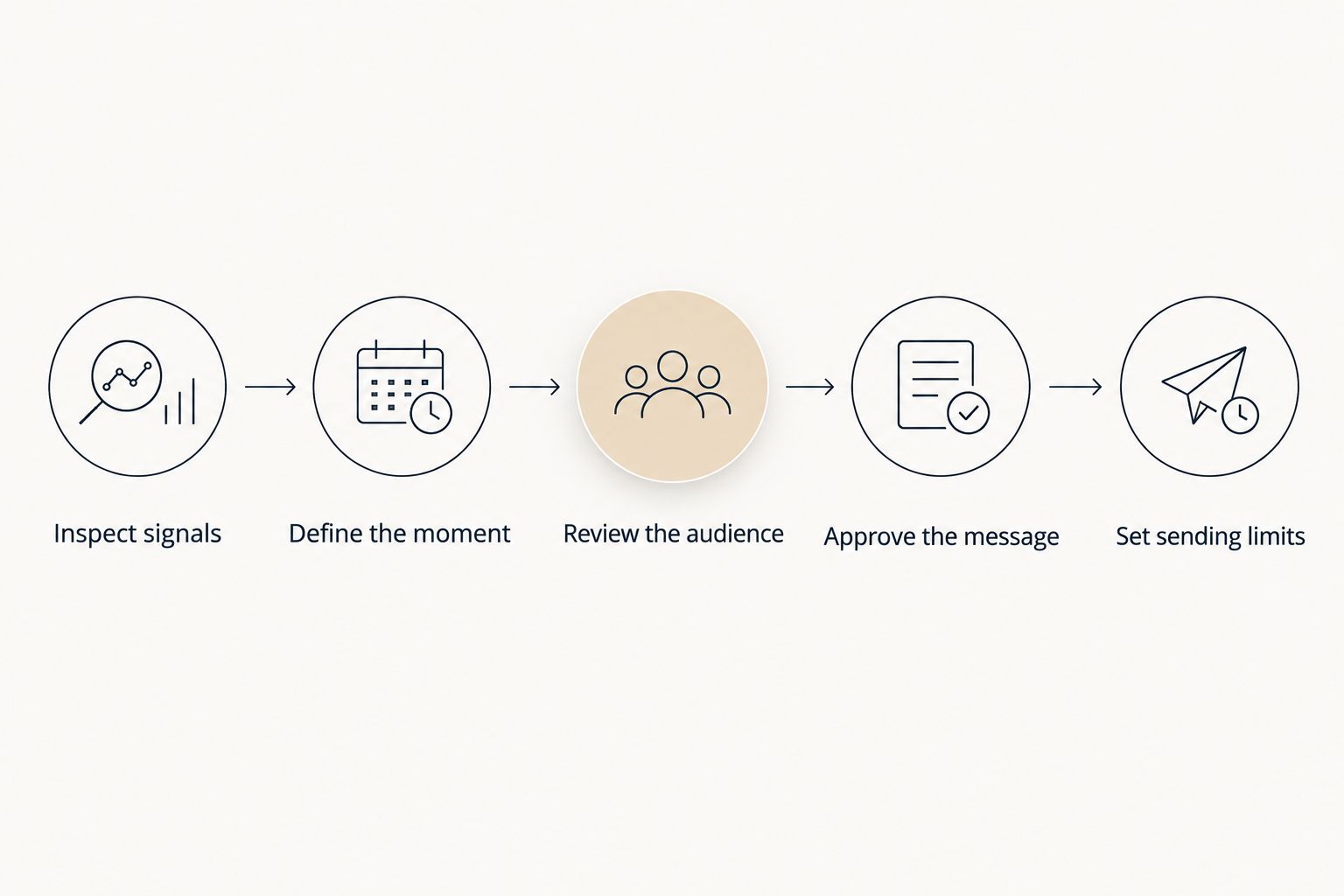
A convincing demonstration explains every transition. If a workflow jumps from customer data to a finished campaign without making the audience decision understandable, keep asking questions before approving it.
How we ranked these options
This 2026 ranking prioritizes the needs of Shopify owners without a dedicated CRM team: moment detection, audience preparation, message preparation, sending control, channel fit, and measurement discipline.
The first position favors reducing campaign-preparation work while keeping approval with the merchant. Klaviyo and Omnisend occupy separate use-case slots for merchants who want to operate their own lifecycle programs. Manual retention remains useful for defining a process before automation.
This is a workflow comparison, not a claim of measured revenue superiority. A ranking cannot establish which option creates incremental profit for your store.
Which customer lifecycle management software should you choose?
Choose Tranthor if you want prepared retention actions and review-first control. Choose Klaviyo if your priority is hands-on flow design, or Omnisend if you want to organize retention around email and SMS. Keep the process manual while you are still defining the rule.
For an undecided Shopify owner in 2026, start with responsibility: who will identify the moment, prepare the audience, write the message, and approve sending? Choose the operating model that answers that question without leaving essential work unassigned.
Review your retention workflow
See how store signals become audiences and campaign drafts, with review before autonomous sending.
FAQ
What's the best customer lifecycle management software for a Shopify owner without a CRM team?
Choose a review-first retention system when you need audiences and messages prepared, not just tools to build campaigns. Check that you can inspect the reason for contact and decide when autonomous sending is allowed.
Is Klaviyo better than Omnisend for lifecycle management?
Neither is the default winner for every merchant. Compare the same customer journey in both, including segmentation, email and SMS steps, exclusions, and the maintenance work your operator will own.
Can customer lifecycle management software replace manual retention work?
It can automate parts of audience selection, message preparation, and sending, depending on the system. You still need ownership of consent, business rules, approval decisions, and measurement.
Should I automate every lifecycle campaign immediately?
No; begin with a clearly defined retention moment and inspect the proposed audience and message. Allow autonomous sending only after the workflow matches the limits you want enforced.
Does attributed revenue prove that retention software increased profit?
No; attributed revenue assigns revenue to activity under an attribution method. Establishing incremental lift requires a credible comparison, and profit also depends on costs and margin.
Do I need WhatsApp as well as email and SMS?
Use WhatsApp only when it fits your customers, consent, and operating requirements. Confirm the actual campaign and approval workflow rather than assuming channel support makes every use case suitable.
When should I move from manual retention to software?
Move when the audience checks and message decisions become repeatable and recurring execution is the work you need removed. Define the rules first so you can judge whether the software applies them correctly.
One last thing
A customer can qualify for a segment without needing a message. Recent purchases, consent, unresolved service issues, and overlapping campaigns can change the decision to send.
Before approving a lifecycle workflow, ask for the exclusion rule alongside the trigger. That is a more useful buying test than admiring the finished copy: it shows whether the workflow knows when to leave a customer alone.