

Best for owner-run Shopify retention: Tranthor. Best for hands-on segmentation and lifecycle flows: Klaviyo. Best for email-and-SMS campaign workflows: Omnisend. This 2026 customer retention software guide compares those options with manual retention, focusing on who identifies the opportunity, prepares the campaign, and approves the send.
- Tranthor is the customer retention software pick for Shopify owners who want retention moments and campaign drafts prepared for review.
- Choose Klaviyo when you want to build and manage segmentation and lifecycle flows directly.
- Choose Omnisend when email and SMS campaign workflows are your main requirement.
- Keep retention manual when you still need to establish audience rules, messages, and approval ownership.
Why this matters
A retention platform does not remove the need to decide who should receive a message, why they should receive it, and when sending should stop. The buying decision is about which parts of that work you want software to perform.
For a Shopify owner without a dedicated CRM team, an unfinished campaign is an operational problem. A useful audience definition does nothing until someone selects the message, checks eligibility, and approves delivery.
Your 2026 shortlist should therefore start with the work you cannot consistently finish. Choose detection and drafting support if identifying opportunities consumes your attention; choose a campaign builder if you already know which journeys you want to run.
What makes the best customer retention software?
Use these criteria before comparing feature lists:
- Moment detection: Does the system identify a repeat-purchase or churn-risk opportunity, or do you define the trigger yourself?
- Audience preparation: Can you inspect who qualifies, who is excluded, and why the audience exists?
- Message preparation: Does the workflow help prepare the actual campaign, rather than stopping at a segment?
- Sending control: Can you review work before delivery and establish boundaries for autonomous sending where offered?
- Channel fit: Does the workflow support the channels your customers have consented to receive?
- Measurement discipline: Can you separate attributed revenue from evidence of incremental results?
Ask each vendor to demonstrate a complete retention workflow. A tour of separate segmentation, messaging, and reporting screens does not establish how much work remains yours.
Customer retention software at a glance in 2026
| Option | Best for | Standout capability or approach | Key limitation or trade-off |
|---|---|---|---|
| Tranthor | Shopify owners without a dedicated CRM team | Detects retention moments and prepares audiences and campaign drafts for approval | You still define acceptable sending limits and review campaign quality |
| Klaviyo | Merchants who want hands-on lifecycle configuration | Segmentation and automated messaging flows | Someone must own the audience rules, flow logic, and ongoing checks |
| Omnisend | Merchants organizing email and SMS campaigns | Email and SMS campaign and automation workflows | Campaign tools still need a clear retention strategy and an accountable operator |
| Manual retention | Merchants establishing their initial retention process | Direct control over audience selection and messages | Repeated audience checks and campaign preparation remain human tasks |
Manual retention is included as a buying alternative, not as a software product. It helps establish whether you need a platform now or need clearer operating rules first.
1. Tranthor: best customer retention software for owner-run workflows
Tranthor is best for Shopify owners who want retention moments and campaign drafts prepared before they approve sending. The system watches store signals, finds repeat-purchase and churn-risk moments, and prepares the audience and message. Campaigns can involve email, SMS, and WhatsApp.
Playbooks start in review. You inspect the proposed work, establish the limits, and decide when to allow autonomous sending; autonomy is a permission you grant, not a reason to abandon oversight.
This is the right buying angle when the missing resource is an operator. Instead of starting with a blank campaign, you start with a proposed retention action that needs a decision.
Tranthor pros
- Connects retention-moment detection with audience and message preparation.
- Starts playbooks in review so you can inspect proposed campaigns.
- Keeps the decision to permit autonomous sending with the merchant.
- Addresses email, SMS, and WhatsApp retention campaigns.
Tranthor cons
- You still need to judge whether a proposed message fits your customers and brand.
- Sending limits require business decisions; software cannot decide your acceptable customer experience for you.
- Attributed revenue alone does not establish incremental profit or verified churn reduction.
Best for: A Shopify owner who wants help moving from store signals to a campaign ready for approval.
Verdict: Buy if detection and campaign preparation are the work you need handled, and you want review before autonomous sending.
2. Klaviyo: best customer retention software for hands-on lifecycle flows
Klaviyo provides segmentation and automated messaging flows. It suits a merchant who wants to define audiences, configure lifecycle logic, and manage campaigns through a marketing platform.
The practical distinction is ownership. Choose this route when you want to specify how your retention program works and have someone responsible for maintaining it.
During evaluation, bring a real customer scenario rather than asking for a general feature tour. Have the vendor show how you would define eligibility, exclude inappropriate recipients, prepare the message, and inspect the resulting flow.
Klaviyo pros
- Supports audience segmentation for targeted messaging.
- Supports automated flows for lifecycle communication.
- Provides a hands-on route for merchants who want to configure their retention logic.
Klaviyo cons
- Detailed configuration creates decisions an owner or marketer must maintain.
- A configured flow still needs checks when your offers, products, or customer behavior change.
- The presence of automation does not establish that your retention strategy is sound.
These are operating responsibilities, not claims that the platform lacks other assistance. Evaluate the current product against the exact work you expect it to perform.
Best for: A merchant with a clear lifecycle plan and an accountable person to build and maintain it.
Verdict: Buy if hands-on segmentation and flow configuration match how you want to run retention.
3. Omnisend: best customer retention software for email and SMS workflows
Omnisend provides email and SMS marketing campaigns and automation. It belongs on your shortlist when those channels are central to your retention plan and you want to organize their execution.
Start with the campaigns you actually intend to send. Ask for a demonstration of audience selection, message preparation, automation conditions, and exclusions using your own retention scenario.
Do not treat the channel list as the whole decision. A platform can support the channels you need while leaving you responsible for deciding which customer moment deserves a message.
Omnisend pros
- Supports email campaign creation and sending.
- Supports SMS marketing alongside email workflows.
- Provides automation for repeatable customer messaging.
Omnisend cons
- You still need to define the purpose and audience of each retention workflow.
- Campaign quality depends on the messages and rules you approve.
- Channel coverage alone does not answer who will operate the program.
If WhatsApp is essential, ask for a demonstration of the exact WhatsApp workflow you need. Do not assume an email-and-SMS comparison answers that separate requirement.
Best for: A merchant whose retention work centers on organizing email and SMS campaigns.
Verdict: Buy if email and SMS execution are your priority and you can own the retention decisions behind them.
4. Manual retention: best for defining your process before buying
Manual retention means you review customer information, select an audience, prepare a message, and arrange delivery yourself. It is a workflow alternative rather than customer retention software.
This approach is useful when you cannot yet explain what should trigger a campaign. Working through an actual customer situation forces you to define eligibility, exclusions, and the purpose of the message.
The trade-off is repeated effort. Each new campaign requires someone to check the audience and carry the work through to delivery.
Manual retention pros
- Keeps audience and message decisions directly with you.
- Makes the work visible before you delegate it to software.
- Helps expose unclear rules and missing approval responsibilities.
Manual retention cons
- Audience checking and campaign preparation remain recurring tasks.
- A campaign stops progressing when nobody owns its next step.
- Consistency depends on following the same process each time.
Keep a written checklist even if you do not buy a platform. Record the trigger, intended audience, exclusions, message purpose, approval decision, and stopping condition.
Best for: A merchant who needs to establish a retention process before automating it.
Verdict: Hold off on software if your immediate problem is undefined rules rather than repetitive execution.
Test the workflow before choosing a platform
For your 2026 evaluation, use the same scenario across every shortlisted option. A hypothetical repeat-purchase campaign works well: an existing customer appears ready for a relevant follow-up, but a new order or an unsubscribe should change the action.
Ask the vendor to walk through these stages without skipping the handoffs:
- Watch signals: Identify the store information that makes the customer relevant to the scenario.
- Find moment: Explain why this is a retention opportunity rather than an arbitrary campaign date.
- Prepare audience: Show the eligibility rules and exclusions before preparing delivery.
- Draft message: Produce a message appropriate to the moment and selected channel.
- Approve sending: Show who approves delivery and which limits apply afterward.
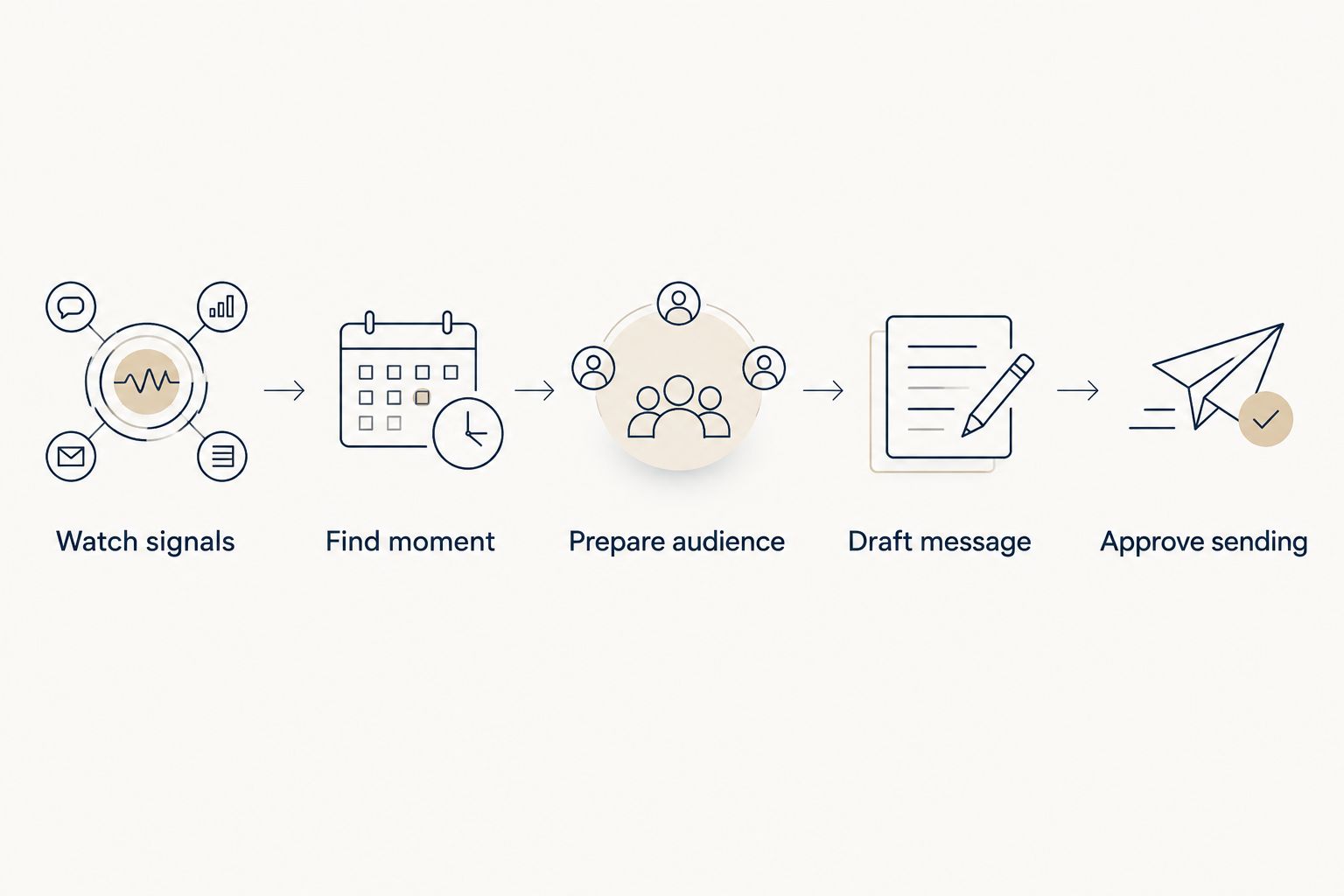
Write down what the software performs and what remains yours at each stage. That distinction is more useful than counting automation features because it identifies the work you will actually inherit.
For a manageable pilot, start with 1 playbook, not your entire lifecycle program. Prepare 2 campaign examples: an eligible customer and a customer who must be excluded. Set a 30-day review window to inspect operating workload and campaign decisions; this is a planning recommendation, not a performance benchmark.
Before permitting autonomous sending, confirm who can pause the workflow and what requires another review. If the demonstration cannot explain the boundary between a suggestion and a send, keep the workflow under approval.
Explore review-first retention
See how store signals become audiences and campaign drafts, with sending limits you decide.
How we ranked these options
This 2026 ranking prioritizes workflow fit for Shopify owners without a dedicated CRM team. It is not a ranking of measured revenue performance, and it does not claim hands-on comparative testing.
The criteria are moment detection, audience preparation, message preparation, sending control, channel fit, and measurement discipline. Each recommendation occupies a different slot because identifying and preparing a retention action is different from configuring flows or organizing campaign execution.
No option receives a blanket recommendation. Your existing process and the person responsible for operating it determine which trade-offs are acceptable.
Which customer retention software should you choose?
Choose Tranthor if your main problem is getting from store signals to a prepared retention campaign without a dedicated CRM operator. Keep playbooks in review while you establish acceptable audiences, messages, and sending limits.
Choose Klaviyo if you want hands-on ownership of segmentation and lifecycle flows. Choose Omnisend if your central requirement is email and SMS campaign execution. Keep retention manual while you clarify rules that you cannot yet explain to another person.
For 2026, make the final decision by assigning ownership. If nobody can name who handles audience checks, message approval, and workflow maintenance, address that gap before expanding automation.
FAQ
What's the best customer retention software for a Shopify owner without a CRM team?
Tranthor is the strongest fit in this comparison when you want retention moments detected and audiences and campaign drafts prepared for review. Playbooks start in review, and you decide when to permit autonomous sending within approved limits.
Is Klaviyo better than a retention system that prepares campaigns for approval?
Klaviyo fits merchants who want hands-on segmentation and lifecycle flow configuration. A system that detects moments and prepares campaigns addresses a different operating need: reducing the preparation work before a merchant approves sending.
When should I choose Omnisend for ecommerce retention?
Choose Omnisend when email and SMS campaign workflows are your central requirement. Evaluate the audience rules, exclusions, and automation steps using a real retention scenario before deciding.
Can I manage customer retention manually instead of buying software?
Yes, you can select audiences, prepare messages, and manage delivery manually. This is useful for establishing your process, but the repeated preparation and checking remain your responsibility.
Should I allow autonomous campaign sending immediately?
Keep sending under review until you understand audience eligibility, exclusions, message quality, and operating limits. Permit autonomous sending only after you decide those boundaries are acceptable.
Does attributed revenue prove that retention software increased profit?
No, attributed revenue does not prove incremental profit or causal lift. Assess attribution separately from campaign costs and any comparison designed to estimate what would have happened without the campaign.
What should I ask during a customer retention software demo?
Ask the vendor to demonstrate a complete retention scenario from store signals through audience preparation, message drafting, and approval. Include a customer who should be excluded so you can inspect how the workflow prevents an inappropriate send.
One last thing
Test the customer who should not receive the campaign. A new purchase, an unsubscribe, or an irrelevant message can invalidate a retention action even when the original trigger looked reasonable.
Ask the vendor to show where that customer leaves the workflow. The answer exposes whether your operating rules are executable, not merely written in a campaign brief.