
Best for retention without a dedicated CRM team: Tranthor. Best for marketer-built lifecycle flows: Klaviyo. Best for coordinated email and SMS campaigns: Omnisend. Best for hands-on control: manual retention. This Shopify marketing automation guide compares the work each approach handles and the work you still own.
- Tranthor is the Shopify marketing automation pick for merchants who want retention moments and campaign drafts prepared for review.
- Choose Klaviyo when you want to build and manage your own lifecycle flows and customer segments.
- Choose Omnisend when coordinated email and SMS campaigns are your main buying requirement.
- Keep retention manual when learning from individual customers matters more than automating repeatable work.
Why this matters
Shopify marketing automation is not just scheduled messages. The buying decision is about who identifies the customer opportunity, selects the audience, prepares the message, and approves the send.
For a Shopify owner without a dedicated CRM team, an automation builder still needs an operator. A tool can execute exactly what you configured while leaving the harder question unanswered: what should you send next?
Choose the operating model before comparing channel lists. In 2026, your shortlist should reflect the retention work you want to stop doing, not just the features you want to add.
What makes the best Shopify marketing automation tool?
Use these criteria before choosing a platform. A strong fit handles your actual workflow without obscuring the decisions you remain responsible for.
- Moment detection: Distinguish systems that identify repeat-purchase or churn-risk moments from systems that execute triggers you define.
- Campaign preparation: Check whether the system prepares an audience and message or leaves both tasks with you.
- Approval control: Establish what requires review, what can send automatically, and who controls that transition.
- Channel fit: Start with the channels your customers have consented to receive, rather than selecting every available channel.
- Operating workload: Identify who maintains segments, checks content, reviews exceptions, and adjusts the workflow.
- Measurement discipline: Separate attributed revenue from evidence of incremental sales or profit.
Bring one real retention task to each evaluation. Ask the vendor to show the complete path from store activity to a reviewed message, rather than demonstrating an isolated template or dashboard.
Shopify marketing automation options at a glance
| Option | Best for | Standout approach | Key limitation or responsibility |
|---|---|---|---|
| Tranthor | Owners without a dedicated retention team | Finds retention moments and prepares campaigns for approval | You still define limits and review whether messages fit your customers |
| Klaviyo | Marketers who want to build lifecycle flows | Segmentation and event-triggered email/SMS flows | Your team owns the flow strategy, content, and maintenance |
| Omnisend | Merchants coordinating email and SMS | Email/SMS campaigns and automated workflows | Your team still decides the audience, offer, timing, and workflow logic |
| Manual retention | Owners learning from individual customer situations | Direct inspection and individual message preparation | Repeated audience selection and follow-up remain manual work |
These are different operating models, not interchangeable feature bundles. The right 2026 choice depends on whether you need campaign preparation, a configurable messaging platform, or direct customer learning.
1. Tranthor: best for owner-led retention operations
The retention CRM watches store signals, finds repeat-purchase and churn-risk moments, and prepares the audience and message. It drafts email, SMS, and WhatsApp campaigns for approval, then sends within approved limits.
Playbooks start in review. You decide when to allow autonomous sending rather than handing over sending authority at the start.
Best for: Shopify owners who want retention opportunities and campaign drafts prepared without assigning every step to a dedicated CRM operator.
What the workflow looks like
The operating sequence is explicit:
- Watch signals: Monitor store activity for relevant customer changes.
- Find moments: Identify a repeat-purchase opportunity or churn-risk moment.
- Prepare campaigns: Assemble the audience and draft the message.
- Review decisions: Check the proposed audience, timing, and content.
- Approve sending: Send within the limits you have approved.
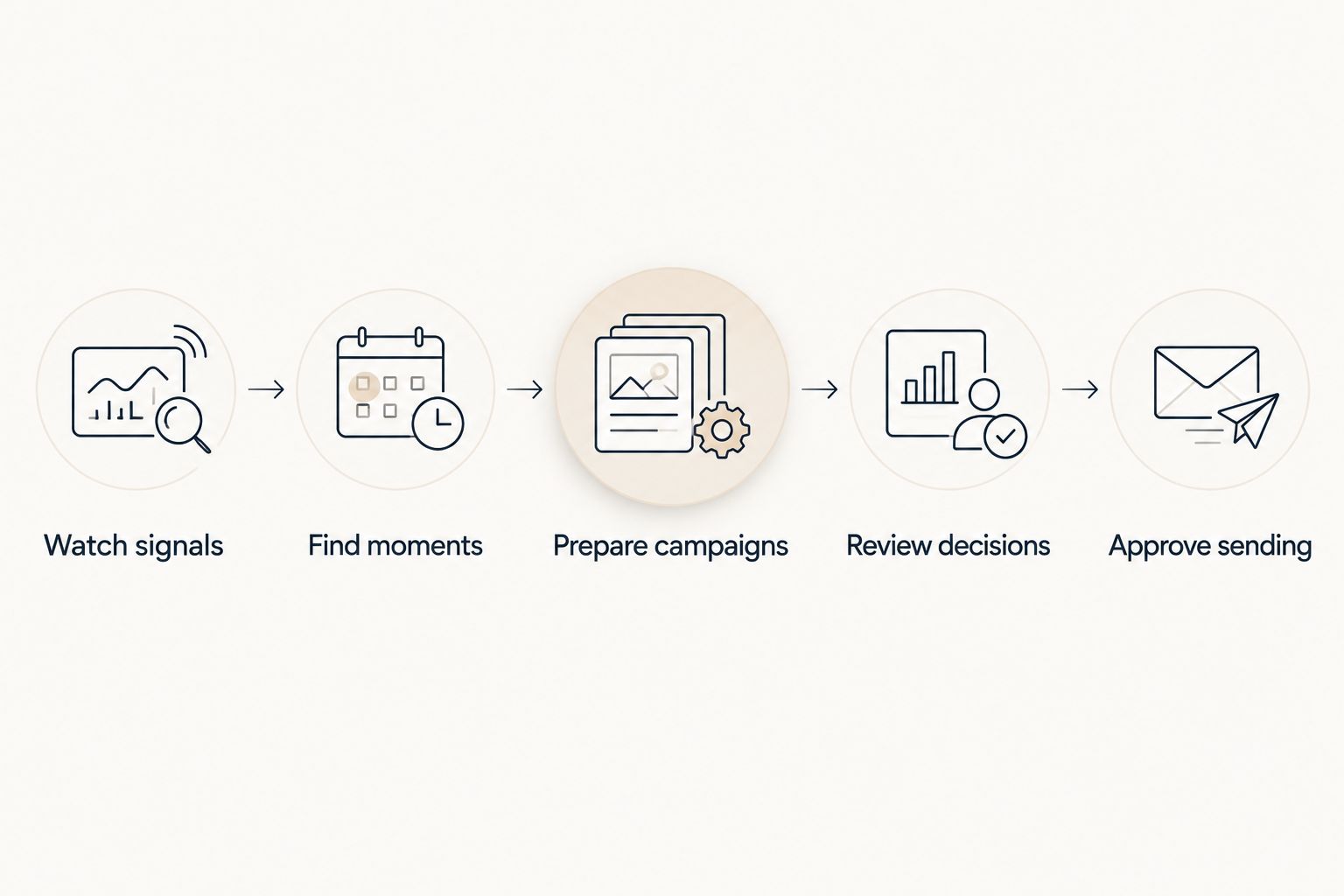
The practical distinction is where your work begins. Instead of starting with a blank campaign, you review a proposed action and decide whether it belongs in your customer experience.
Tranthor pros
- Prepares the audience and message around a detected retention moment.
- Supports campaign drafting across email, SMS, and WhatsApp.
- Starts playbooks in review rather than requiring immediate autonomous sending.
- Leaves the decision to permit autonomous sending with the merchant.
Tranthor cons
- Review-first operation still requires you to assess proposed messages.
- Autonomous sending requires clear limits; it is not a substitute for merchant judgment.
- Attributed revenue does not establish incremental lift, profit, or verified churn reduction.
During evaluation, ask to see the audience and message for a retention moment relevant to your store. Check whether the explanation gives you enough context to approve the action without reconstructing the entire decision yourself.
Verdict: Buy if you want campaign preparation around retention moments while keeping control over sending.
2. Klaviyo: best for marketer-built lifecycle flows
Klaviyo provides customer segmentation, email and SMS marketing, and automated flows triggered by customer activity. It suits an operating model where someone deliberately builds and maintains the lifecycle program.
The deciding factor is ownership. If you want to choose the events, write the branches, and refine messages yourself, a configurable flow platform fits that responsibility.
Best for: A Shopify business with a named operator who wants direct control over lifecycle logic and segmentation.
Klaviyo pros
- Combines customer segments with event-triggered messaging.
- Supports email and SMS within a lifecycle marketing program.
- Lets a marketer define distinct paths for different customer situations.
Klaviyo cons
- Flow configuration does not replace decisions about audience, message, or timing.
- More branches create more conditions and content for your operator to review.
- A functioning automation still needs an owner when products, offers, or customer behavior change.
Use a real returning-customer scenario in your evaluation. Ask the operator to explain how a customer enters the flow, what stops another message, and how the customer exits after purchasing.
Do not judge the platform solely by how quickly a template becomes active. Judge whether your team understands the resulting logic well enough to maintain it.
Verdict: Buy if you want to own lifecycle design and have someone responsible for maintaining it.
3. Omnisend: best for coordinated email and SMS campaigns
Omnisend provides email and SMS marketing, segmentation, and automated workflows for ecommerce. It belongs on the shortlist when your main task is coordinating messages across those channels.
The buying question is whether you want a campaign workspace that your team operates. Evaluate the workflow you will actually maintain, not a hypothetical program with every possible branch enabled.
Best for: Shopify merchants whose immediate requirement is running email and SMS campaigns through a shared automation workflow.
Omnisend pros
- Supports email and SMS marketing in the same platform.
- Provides automated workflows for repeatable customer communications.
- Supports audience segmentation rather than requiring every campaign to address the same customers.
Omnisend cons
- Your team still decides the commercial purpose and content of each campaign.
- Adding another channel creates additional consent and message-review responsibilities.
- Automated execution does not establish whether a campaign generated incremental demand.
Ask for a demonstration of one journey that uses both email and SMS. Inspect the conditions for sending each message, the suppression rules, and the process for changing content after the workflow is active.
A merchant who mainly needs coordinated messaging should evaluate that job directly. Do not select a broader retention operating model simply because it sounds more advanced.
Verdict: Buy if coordinated email and SMS execution is your priority and you will own campaign decisions.
4. Manual retention: best for learning before automation
Manual retention means reviewing customer and order information, identifying a reason to follow up, and preparing the message yourself. It is not a Shopify marketing automation platform, but it is a real alternative when the process is still being defined.
Manual work is especially useful when you cannot yet explain why a particular customer should receive a particular message. Automating an unclear decision only repeats that uncertainty.
Best for: Owners developing a retention approach through individual customer situations before turning it into a repeatable playbook.
Manual retention pros
- Keeps audience selection and message context visible to the owner.
- Makes unusual customer circumstances easier to consider individually.
- Helps you document the reasoning behind a future automated workflow.
Manual retention cons
- Requires repeated checking, audience preparation, and follow-up.
- Depends on someone remembering the next action.
- Makes consistent execution harder as the number of customer situations grows.
Use a written decision log. Record the customer situation, why a message is appropriate, what would make it inappropriate, and what should happen after a purchase or reply.
Verdict: Hold automation until you can describe the decision clearly; keep manual handling for genuine exceptions.
How the options are ranked
This 2026 shortlist prioritizes the responsibilities of a Shopify owner without a dedicated CRM team. The ranking follows moment detection, campaign preparation, approval control, channel fit, ongoing workload, and measurement discipline.
It is a fit-based ranking, not a claim that one platform produces higher revenue than another. The first option addresses delegated campaign preparation; the next options address marketer-operated messaging; manual retention addresses learning and exceptions.
A tool ranks well only when its operating model matches the work you want it to own.
Run a practical evaluation before committing
Use the same retention scenario for every 2026 demo. A returning customer whose purchase pattern has changed is more useful than a vendor-selected example with no connection to your store.
Set aside 30 minutes for a workflow walkthrough. This is a suggested evaluation window, not a claim about setup time or the time required to operate any platform.
Follow the customer through the process:
- Identify the store signal that makes the customer relevant.
- Explain why the proposed audience includes that customer.
- Review the message and the reason for its timing.
- Check consent, exclusions, and overlapping campaigns.
- Show what changes after the customer purchases or replies.
- Confirm who can approve sending or change the rules.
Then choose 1 retention workflow for the initial review. Keep its objective narrow enough that you can inspect every decision rather than approving an unfamiliar collection of campaigns.
Schedule a checkpoint after 7 days of review. Use that checkpoint to assess audience quality, message relevance, and operator workload—not to declare proven revenue lift.
Review the retention workflow
See the approach to retention moments, campaign drafts, and merchant-controlled sending.
Which Shopify marketing automation option should you choose?
Choose campaign preparation when your bottleneck is deciding whom to contact and drafting the next relevant message. Choose Klaviyo when you want a marketer to own lifecycle flow design. Choose Omnisend when coordinated email and SMS execution is the immediate requirement.
Keep manual retention when you are still discovering the decision rules or handling customer exceptions. Manual work becomes a problem when a repeatable process remains dependent on memory.
For an undecided owner without a CRM team, start by evaluating the review-first retention workflow ranked first. Compare it against the work you already do, and keep autonomous sending a separate decision.
FAQ
What's the best Shopify marketing automation tool for a small team?
The best fit depends on whether the team needs campaign preparation or a platform it will operate itself. Prioritize review-first retention workflows when audience selection and message drafting are the bottleneck; prioritize flow builders when a named operator owns lifecycle design.
Is Klaviyo better than Omnisend for Shopify?
Neither is universally better for every Shopify merchant. Compare Klaviyo for marketer-built lifecycle flows and Omnisend for coordinated email and SMS campaigns, then evaluate the same customer scenario in both.
Can Shopify retention campaigns run without manual approval?
Autonomous sending should be a separate permission decision from campaign preparation. Start with review, define acceptable audiences and messages, and approve autonomous operation only within limits you understand.
Should I automate email, SMS, and WhatsApp together?
Start with the channels your customers have consented to receive and that your retention workflow actually needs. Adding channels also adds consent checks, content decisions, and coordination responsibilities.
How do I compare Shopify marketing automation costs?
Compare current vendor terms against your intended audience, channels, and sending activity. Include the internal work required to build campaigns, review decisions, and maintain workflows rather than evaluating the subscription alone.
Does attributed revenue prove retention automation is profitable?
No. Attributed revenue assigns sales under an attribution method; it does not establish incremental sales or profit. Evaluate margins, operating costs, and an appropriate comparison method separately.
When should I stop doing retention manually?
Automate once you can describe a repeatable customer situation, the appropriate message, and the conditions that stop it. Keep unusual or sensitive customer cases under direct review.
One last thing
Your most useful 2026 demo question is not whether the platform can send another message. Ask: What stops this customer from receiving a message that no longer makes sense?
A purchase, reply, consent change, or overlapping campaign can change the decision. Inspect those conditions before approving the send; attractive message copy does not compensate for the wrong audience.