

Best overall for a Shopify owner without a CRM team: Tranthor. Best for WhatsApp-focused campaigns: WATI. Best for shared conversations: respond.io. Best for hands-on follow-up: the WhatsApp Business app. This 2026 guide compares WhatsApp marketing software by the work you need it to perform, not the length of its feature list.
- Tranthor is the best WhatsApp marketing software shortlist choice for Shopify owners seeking review-first retention workflows.
- Choose WATI for WhatsApp-focused campaigns; choose respond.io when shared customer conversations drive the decision.
- Use the WhatsApp Business app for manual follow-up when you can personally manage every conversation.
- Compare audience selection, consent, approval controls, and measurement before choosing ecommerce retention software.
Why this matters
Sending a WhatsApp message is only one part of retention. You must decide who needs attention, whether contact is permitted, what the message should say, and when to stop.
A campaign platform, a shared inbox, and a retention CRM solve different parts of that job. Buying an inbox does not decide your repeat-purchase strategy. Buying automation does not remove your responsibility for consent or message quality.
For your 2026 shortlist, identify the bottleneck first: finding retention moments, building campaigns, or managing replies. That distinction determines which option deserves a demonstration.
What makes the best WhatsApp marketing software?
- Retention timing: The workflow should connect messages to a relevant customer event, not just a calendar slot.
- Audience preparation: You need a clear explanation of who qualifies, who is excluded, and why.
- Sending controls: Review steps, permissions, and suppression rules must match how much responsibility you want to delegate.
- Conversation handling: Someone must own replies, including questions that turn into service requests.
- Channel coordination: WhatsApp should fit alongside email and SMS rather than repeat every message across every channel.
- Measurement discipline: Reports should separate attributed orders from evidence of incremental revenue or profit.
WhatsApp marketing software at a glance
| Option | Best for | Standout capability | Key limitation |
|---|---|---|---|
| Tranthor | Shopify retention without a dedicated CRM team | Detects retention moments and prepares campaigns for approval | Initial review and merchant-defined limits remain part of the work |
| WATI | WhatsApp-focused campaign operations | WhatsApp broadcasts, automation, and a shared team inbox | Campaign rules and message content still need an owner |
| respond.io | Managing conversations across messaging channels | Shared inbox and workflow automation | Inbox workflows do not define your retention strategy |
| WhatsApp Business app | Personally managed customer follow-up | Business messaging with labels and quick replies | Audience selection, follow-up, and recordkeeping remain largely manual |
Choose by the work you want removed. Retention preparation, campaign execution, conversation routing, and personal follow-up are distinct jobs.
1. Tranthor: best for review-first Shopify retention
Tranthor is a retention CRM that watches store signals, finds repeat-purchase and churn-risk moments, and prepares audiences and messages. Its email, SMS, and WhatsApp campaigns start in review; you decide when to allow autonomous sending within limits you set.
Tranthor is best for Shopify owners who want retention campaigns prepared for approval without a dedicated CRM team. The buying question is whether you want help deciding what to send, rather than only a tool for sending a campaign you already planned.
Pros:
- Connects retention work to store signals and customer moments.
- Prepares the audience and message rather than leaving both as separate manual tasks.
- Starts playbooks in review so you retain the approval decision.
- Covers email, SMS, and WhatsApp within its retention remit.
Cons:
- Review-first operation still requires your attention before you delegate sending.
- You must define acceptable limits; automation does not decide your business boundaries.
- Attributed revenue does not establish causal lift, profit, or verified churn reduction.
Best for: A Shopify merchant whose bottleneck is preparing relevant retention campaigns, not simply distributing messages.
During a demonstration, ask to follow one proposed campaign from its store signal to its audience and draft. Then ask how approval and autonomous sending differ. Judge the complete workflow, not the quality of an isolated message.
Verdict: Buy for retention preparation with merchant-controlled sending; skip if that is not the work you need removed.
2. WATI: best for WhatsApp-focused campaign operations
WATI provides WhatsApp campaign, automation, and shared-inbox capabilities. It belongs on your shortlist when WhatsApp is the channel you want to organize and your team already knows which audiences and campaigns it wants to run.
The distinction is operational. You are evaluating a WhatsApp-focused workspace for executing campaigns and handling conversations, rather than assuming the platform will define your lifecycle strategy.
Pros:
- Supports WhatsApp broadcasts for campaign execution.
- Provides a shared inbox for team-based conversation handling.
- Offers automation for repeatable messaging workflows.
Cons:
- Someone must define campaign entry rules, exclusions, and message content.
- A broadcast capability does not determine whether a particular customer should receive a retention message.
- Automated conversations still need an escalation path for questions outside the workflow.
Best for: A merchant with a defined WhatsApp campaign plan who needs tools to run it and manage the resulting replies.
Ask WATI to demonstrate your intended campaign from audience selection through response handling. Include an opted-out customer and an unresolved service question in the demonstration brief. Those cases reveal whether the proposed setup fits your operating rules.
Verdict: Buy for WhatsApp campaign execution when you have an owner for targeting and content.
3. respond.io: best for shared customer conversations
respond.io brings messaging conversations into a shared inbox and supports workflow automation. It fits a merchant whose immediate problem is assigning, routing, and following up on conversations across messaging channels.
Start the evaluation with what happens after a customer replies. If messages move between sales, support, and the store owner, conversation ownership deserves more attention than another campaign composer.
Pros:
- Gives a team a shared workspace for messaging conversations.
- Supports workflow automation around conversation handling.
- Brings multiple messaging channels into the conversation-management process.
Cons:
- Routing requires defined ownership and escalation rules.
- A shared inbox does not, by itself, establish repeat-purchase timing or campaign eligibility.
- Retention reporting still needs a clear distinction between a conversation and a resulting purchase.
Best for: A merchant whose messaging workload involves handoffs and shared responsibility rather than one person managing every reply.
Ask respond.io to demonstrate an incoming WhatsApp reply, its assignment, and its escalation when the first owner cannot resolve it. Then inspect how the conversation closes. A workflow that routes a message but leaves ownership ambiguous has not solved the operational problem.
Verdict: Buy for coordinated conversations; hold if your main problem is deciding which retention campaigns to create.
4. WhatsApp Business app: best for manual customer follow-up
The WhatsApp Business app supports direct business messaging, labels, and quick replies. It suits an owner who wants to handle customer conversations personally and can keep track of the follow-up work.
This is a manual operating choice, not an equivalent replacement for a retention CRM. You remain responsible for deciding who needs contact, checking permission, writing the message, and recording what happened.
Pros:
- Keeps the owner directly involved in customer conversations.
- Provides labels to help organize contacts and chats.
- Supports quick replies for recurring questions.
Cons:
- Customer selection and follow-up depend on your own process.
- Labels do not calculate repeat-purchase timing or establish campaign eligibility.
- Manual recordkeeping makes it harder to separate messaging activity from reliable retention measurement.
Best for: An owner who can personally review each intended follow-up and maintain a clear record of consent and conversation history.
Use manual follow-up deliberately. Keep a simple record of why you contacted someone, what you sent, and whether another message is appropriate. Do not treat possession of a phone number as permission for marketing.
Verdict: Buy into this approach for personal follow-up; skip it when manual coordination is already the bottleneck.
Where Klaviyo and Omnisend fit
Klaviyo and Omnisend belong in the discussion when your existing retention work already runs through email and SMS. Both provide ecommerce marketing automation; the practical question is what an additional WhatsApp workflow would change.
Do not replace an established setup simply because a new shortlist exists. Write down the missing job: detecting a retention moment, preparing an audience, drafting a message, sending through WhatsApp, or handling the reply.
Then ask each shortlisted vendor to demonstrate that job using your intended setup. Establish whether WhatsApp is handled directly or through another service, who owns suppression rules, and where replies arrive. Verify the current arrangement rather than assuming every channel works the same way.
Keep Klaviyo or Omnisend in the decision when preserving existing email and SMS operations matters. Evaluate a replacement only against a named operational gap. A second platform that duplicates messages creates more coordination work, not a clearer retention process.
Check the workflow before you choose
For a useful 2026 evaluation, start with 1 playbook, such as a repeat-purchase reminder. This is a proposed evaluation task, not a claim about results or setup time.
Ask the vendor to show the following sequence with your intended operating rules:
- Store signals: Identify the customer event or purchase information that starts the evaluation.
- Retention moment: Explain why the customer qualifies now rather than simply belonging to a broad list.
- Audience and message: Show inclusion, exclusions, channel permission, and the proposed message together.
- Review: Demonstrate what you approve and what happens when you reject the draft.
- Approved sending: Show the boundary between reviewed operation and any autonomous sending you authorize.
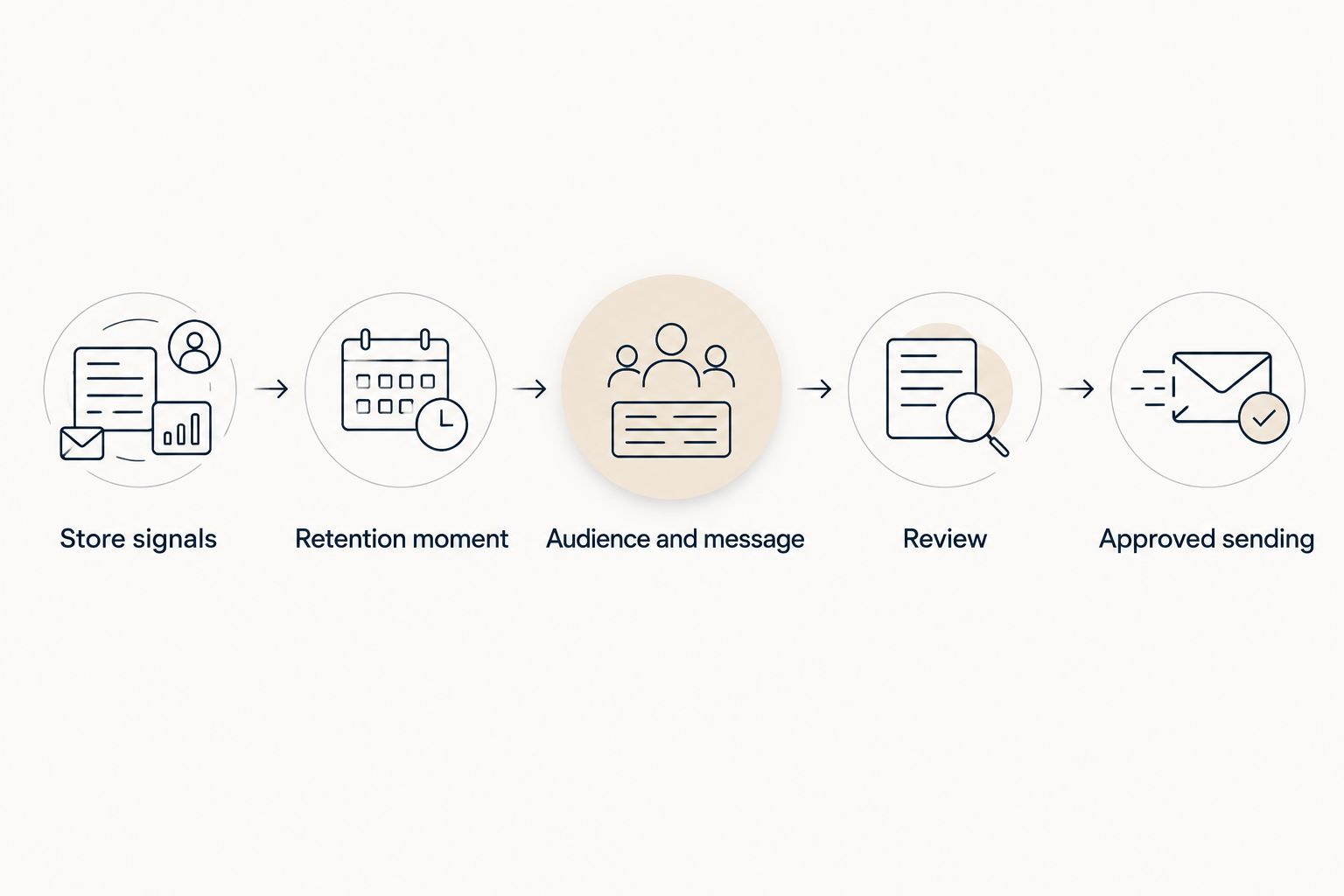
Before authorizing a send, make 3 checks: the audience is appropriate, the channel permission is valid, and the message fits the customer moment. Keep those checks even when the draft reads well.
Separate 2 outcomes in reporting: the customer response and the attributed purchase. Neither alone proves that the message created incremental profit. If you need evidence of lift, plan an appropriate comparison rather than treating attribution as an experiment.
How the options are ranked
This 2026 ranking prioritizes the stated buyer: a Shopify owner running retention without a dedicated CRM team. The order follows retention preparation, campaign execution, conversation management, and manual follow-up.
The criteria are workflow fit, audience preparation, sending controls, reply ownership, channel coordination, and measurement discipline. This is a use-case ranking, not a claim that every feature has been tested or that one platform wins every merchant's requirements.
Which WhatsApp marketing software should you choose?
Choose Tranthor when preparing retention campaigns is the work you want removed. Start in review, inspect the audience and message, and authorize autonomous sending only when the operating limits match your requirements.
Choose WATI when you already have a WhatsApp campaign plan. Choose respond.io when shared conversations and handoffs drive the purchase. Choose the WhatsApp Business app when personal follow-up remains manageable and intentional.
For an undecided buyer in 2026, the next move is a workflow demonstration—not a feature-count comparison. Bring one customer moment and require the vendor to show the entire path through to reply handling.
FAQ
What's the best WhatsApp marketing software for a Shopify owner without a CRM team?
Tranthor is the strongest shortlist choice when you want retention moments, audiences, and messages prepared for review. Its playbooks start in review, and you decide when to authorize autonomous sending within limits you set.
Is WATI better than respond.io for ecommerce?
WATI is the more relevant shortlist option for WhatsApp-focused campaigns; respond.io fits shared conversation management across messaging channels. Choose according to whether campaign execution or conversation ownership is your main problem.
Can I use the WhatsApp Business app instead of marketing software?
Yes, the WhatsApp Business app fits personally managed customer follow-up. You remain responsible for audience selection, permission checks, message preparation, and recordkeeping.
Should I replace Klaviyo or Omnisend to add WhatsApp?
Replace an existing platform only when the proposed setup solves a specific operational gap. Ask vendors to demonstrate WhatsApp delivery, suppression rules, reply handling, and coordination with your existing email and SMS workflows.
Do I need permission to send WhatsApp marketing messages?
Yes, WhatsApp business messaging requires appropriate opt-in, and applicable privacy and marketing laws also matter. A customer's phone number or past purchase is not a substitute for checking the relevant permission requirements.
Does WhatsApp attributed revenue prove a campaign worked?
Attributed revenue does not prove incremental lift or profit. It connects an order to messaging under an attribution method; a causal claim needs an appropriate comparison.
What should I ask during a WhatsApp software demo?
Ask the vendor to demonstrate a complete retention workflow, from the qualifying store signal to audience selection, approval, sending, and reply handling. Include an opted-out customer and a service issue so the demonstration covers exclusions and escalation.
One last thing
The most useful demonstration includes someone who should not receive the message. Ask why that customer is excluded and where you can inspect the decision. A polished draft shows writing quality; a correct exclusion shows whether the workflow respects your rules.